
Test Parameters
🗓️ Last updated on June 13, 2024 | 7 | Improve this pageIntroduction
From the page displaying basic information on your API or Service mocks, you have the ability to launch new tests against different endpoints that may represent different environments in your development process. Hitting the NEW TEST… button leads you to the following form, where you will be able to specify a target URL for the test, as well as a Runner—a testing strategy for your new launch:
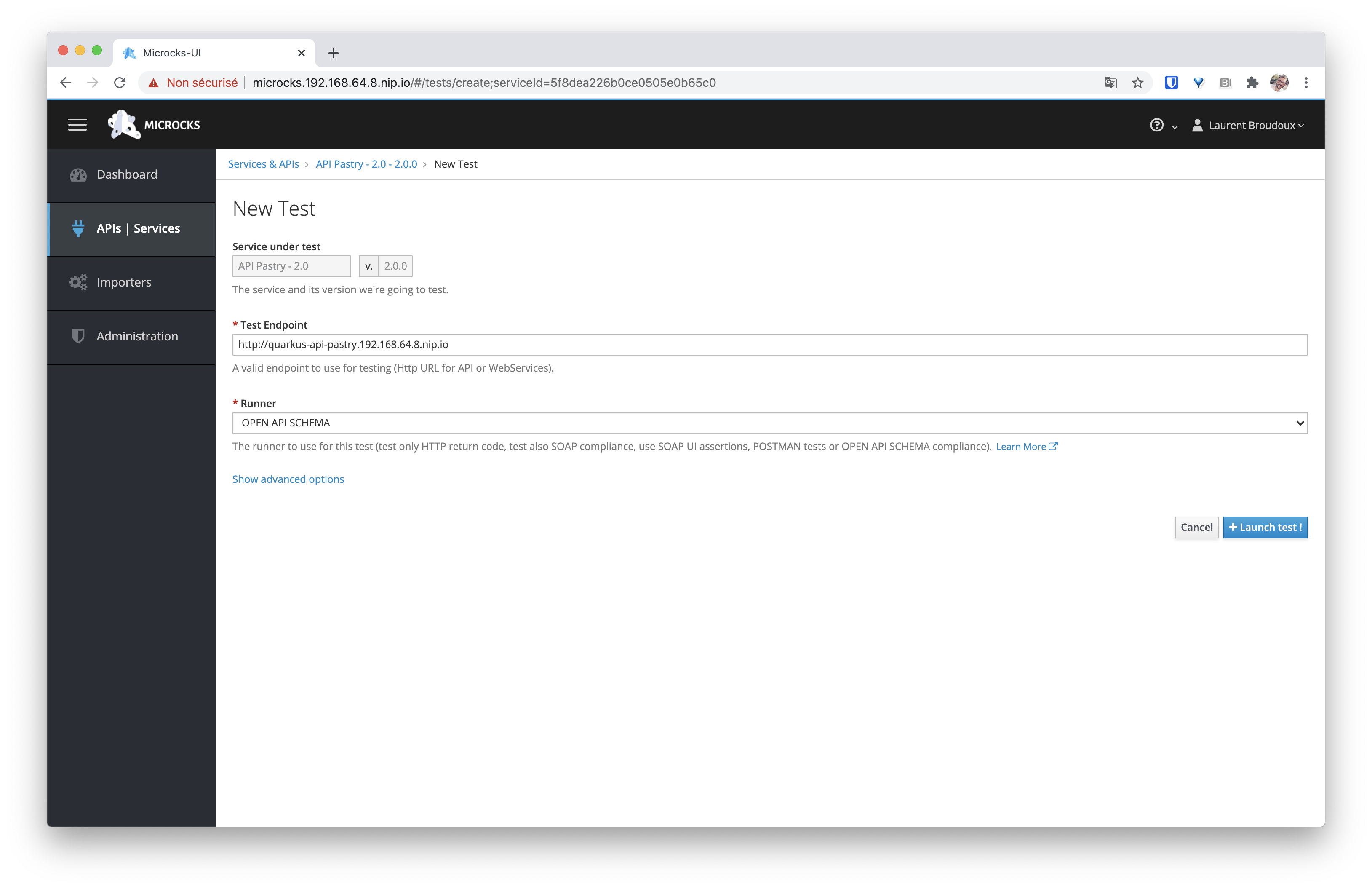
This reference documentation walks you through the available parameters when launching a new test in Microcks. All the parameters mentioned below are available whether you’re launching a Test via the Web UI, via the API, via the CLI or any other libraries.
Service under test
Service under test is simply the API/Service specification we use for this test. This is a couple of Service Name and Service Version. Depending on the Runner you choose, Microcks while reuse the information of an Artifact attached to this Service name and version.
Test Endpoint
The Test Endpoint is simply a URI where a deployed component provides an endpoint that implements your API specification. In the testing literature, this is usually defined as the System Under Test URI.
Depending on your API/Service type and the protocol binding you want to connect to (especially for event-based APIs), Test Endpoints may use different syntax. Please jump to the Endpoints syntax section on this page to learn more.
Test Runner
Microcks offers different strategies for running tests on endpoints where our microservice is being developed and deployed. We recommend reading our explanations on Conformance Testing. Such strategies are implemented as Test Runners. Here are the default Test Runners available within Microcks:
Test Runner | API & Service Types | Description |
|---|---|---|
HTTP | REST and SOAP | Simplest test runner that only checks that valid target endpoints are deployed and available - it means return a 20x or 404 HTTP status code when appropriate. This can be called a simple “smock test”. |
SOAP | SOAP | Extension of HTTP Runner that also checks that the response is syntactically valid regarding the SOAP WebService contract. It validates the response payload against the service’s XSD schemas. |
SOAP_UI | REST and SOAP | When the API artifact is defined using SoapUI: ensures that assertions put into SoapUI Test cases are checked as valid. Report failures otherwise. |
POSTMAN | REST, SOAP and GRAPHQL | When the API artifact is defined using Postman: executes test scripts as specified within a Postman Collection. Report failures otherwise. |
OPEN_API_SCHEMA | REST | When the API artifact is defined using Open API: it executes example requests and checks that results have the expected HTTP status and that the payload is compliant with the OpenAPI schema specified in the OpenAPI specification. Report failures otherwise. |
ASYNC_API_SCHEMA | EVENT | When the API artifact is defined using Async API: it connects to specified broker endpoints, consumes messages and checks that the payload is compliant with the AsyncAPI schema specified in the AsyncAPI specification. Report failures otherwise. |
GRPC_PROTOBUF | GRPC | When the API artifact is defined using gRPC/Protobuf: it executes example requests and checks that the results payload is compliant with the Protocol Buffer schema specified in the gRPC protobuf file. Report failures otherwise. |
GRAPHQL_SCHEMA | GRAPHQL | When the API is of type GraphQL: it executes example requests and checks that the results payload is compliant with the GraphQL Schema of the API. Report failures otherwise. |
Operations
Depending on the Test you are running, you may want to filter the list of operations that will actually be tested. By default, all operations are included in the test, but you can pick and choose the ones you want.
💡 When running a Test on an Event-based API using the
ASYNC_API_SCHEMAstrategy, you will have to choose one and only one operation at a time. This is because Async endpoints may differ for each operation, so a Microcks test can include only one Async operation.
Timeout
Depending on the type of Service or Test you are running, the Timeout specification may be mandatory. This is a numerical value expressed in milliseconds.
Secret
Depending on the Test Endpoint you are connecting to, you may need additional authentication information, such as credentials or custom X509 Certificates. You may reuse an Authentication Secret that your administrator has made available in the Microcks installation.
OAuth2
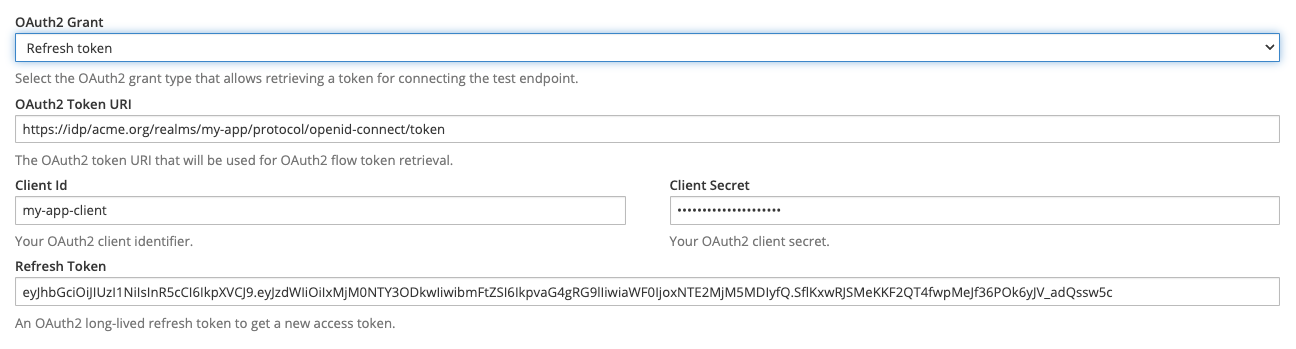
If the secured Test Endpoint cannot be accessed using a static Authentication Secret, Microcks can handle an OAuth2/OpenID Connect authentication flow as part of the Test’s prerequisites to retrieve an ephemeral bearer token.
The supported Oauth2 grant types are Client credentials, Refresh token and Password. For each of these authentication flows, you will have to provide additional information like:
- The OAuth2 Token URI: a URL that will be used for token retrieval,
- The Client Id: the OAuth2 client identifier,
- The Client Secret: the OAuth2 secret,
- The Scopes: the optional OAuth2 scopes you need (
openidis always included).
Additionally, you will have to provide a Refresh Token when using the Refresh token grant type 😉
Headers Override
This optional parameter allows you to add/override request headers with global or operation-specific ones. You have to use a comma-separated string for multiple values corresponding to the same header.
Endpoints syntax
HTTP-based APIs
For HTTP-based APIs (REST, SOAP, GraphQL or gRPC), this is a simple URL that should respect the following pattern:
http[s]://{service.endpoint.url:port}[/{service.path}]
The /{service.path} may be optional if your target API is deployed on the root context.
Event-based APIs
For Event-based API testing via the Async API, the pattern depends on the protocol binding you’d like to test.
Kafka
Kafka Test Endpoint has the following form with optional parameters placed just after a ? and separated using the & character:
kafka://{kafka.broker.url:port}/{kafka.topic.name}[?param1=value1¶m2=value2]
| Optional Params | Description |
|---|---|
registryUrl | The URL of the schema registry that is associated with the tested topic. This parameter is required when using and testing Avro encoded messages. |
registryUsername | The username used if access to the registry is secured. |
registryAuthCredSource | The source for authentication credentials, if any. Valid values are just USER_INFO. |
As an example, you may have this kind of Test Endpoint value: kafka://mybroker.example.com:443/test-topic?registryUrl=https://schema-registry.example.com®istryUsername=fred:letmein®istryAuthCredSource=USER_INFO
MQTT
MQTT Test Endpoint has the following form with no optional parameters:
mqtt://{mqtt.broker.url:port}/{mqtt.topic.name}
AMQP
AMQP 0.9.1 Test Endpoint has the following form with optional parameters placed just after a ? and separated using the & character:
amqp://{amqp.broker.url:port}/[{amqp.vhost}/]{amqp.destination.type}/{amqp.destination.name}[?param1=value1¶m2=value2]
amqp.destination.type is used to specify if we should connect to either a queue (use the q value) or an exchange specifying its type: d for direct, f for fanout, t for topic, h for headers. Then you have to specify either the queue or exchange name in amqp.detaintion.name.
Depending on the type of destination, you will need additional optional parameters as specified below:
| Optional Params | Description |
|---|---|
routingKey | Used to specify a routing key for direct or topic exchanges. If not specified, the * wildcard is used. |
durable | Flag telling if the exchange to connect to is durable or not. Default is false. |
h.{header} | A bunch of headers where the name starts with h. in order to deal with header exchange. The x-match property is set to any to gather the most messages as possible. |
As an example, you may have this kind of Test Endpoint values: amqp://rabbitmq.example.com:5672/h/my-exchange-headers?h.h1=h1&h.h2=h2 or amqp://rabbitmq.example.com:5672/my-vhost/t/my-exchange-topic?routingKey=foo
WebSocket
WebSocket Test Endpoint has the following form with no optional parameters
ws://{ws.endpoint.url:port}/{channel.name}
NATS
NATS Test Endpoint has the following form with no optional parameters:
nats://{nats.endpoint.url:port}/{queue-or-subject.name}
Google PubSub
Google PubSub Test Endpoint has the following form with no optional parameters:
googlepubsub://{google-platform-project.name}/{topic.name}
Amazon SQS
Amazon Simple Queue Service Test Endpoint has the following form with optional parameters placed just after a ? and separated using the & character:
sqs://{aws.region}/{sqs.queue.name}[?param1=value1]
| Optional Params | Description |
|---|---|
overrideUrl | The AWS endpoint override URI used for API calls. Handy for using SQS via LocalStack |
Amazon SNS
Amazon Simple Notification Service Test Endpoint has the following form with optional parameters placed just after a ? and separated using the & character:
sns://{aws.region}/{sns.topic.name}[?param1=value1]
| Optional Params | Description |
|---|---|
overrideUrl | The AWS endpoint override URI used for API calls. Handy for using SNS via LocalStack |

Still Didn’t Find Your Answer?
Join our community and get the help you need. Engage with other members, ask questions, and share knowledge to resolve your queries and expand your understanding.
Join the community